


![[Interview] Inside Spatial Signage: How Samsung Brought Glasses-Free 3D Displays to Life](https://www.hawkdive.com/media/samsung-tvs-and-displays-spatial-signage-interview_thumb932-218x150.jpg "Samsung’s Glasses-Free 3D Displays: The Inside Story [Interview]")





Apple Unveils Digital ID: A Revolutionary Approach to Identity Management within Apple Wallet
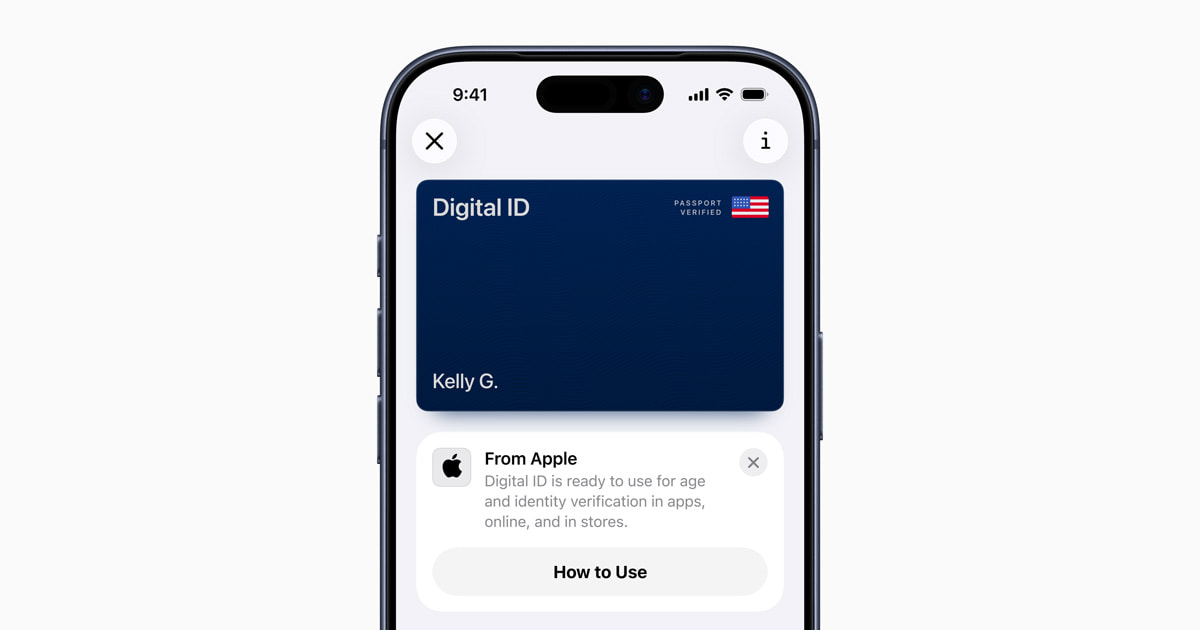
In a significant leap forward in digital identity management, Apple has announced the introduction of Digital ID, an innovative feature that allows users to create an identity card within the Apple Wallet using details from their U.S. passport. This new functionality offers a secure and private method for users to present their identity through their iPhone or Apple Watch. Initially, the Digital ID will be available in beta at Transportation Security Administration (TSA) checkpoints across over 250 airports in the United States, primarily for identity verification during domestic air travel. Apple plans to expand the use cases for Digital ID in the future.
A Broader Accessibility to Digital ID
The introduction of Digital ID is particularly beneficial for users who do not possess a REAL ID-compliant driver’s license or state ID. While it opens up a more accessible way to carry identification, it is important to note that Digital ID does not replace a physical passport and cannot be used for international travel or border crossings. The Digital ID is strictly for domestic applications within the United States.
Apple’s vice president of Apple Pay and Apple Wallet, Jennifer Bailey, expressed enthusiasm about the launch, stating that the company is eager to extend the convenience and security of identity management to more users. Since Apple enabled the addition of driver’s licenses and state IDs to Apple Wallet in 2022, users have appreciated the convenience of having their identification readily available on their devices. The Digital ID expands this capability to a broader audience, allowing users to add an ID using information from their U.S. passport.
Creating and Adding a Digital ID
Setting up a Digital ID in the Apple Wallet is a straightforward process. Users start by launching the Wallet app on their iPhone, tapping the Add (+) button, and selecting the option for Driver’s License or ID Cards. They then choose Digital ID and follow the prompts to initiate the setup and verification process.
During this process, users will be required to scan the photo page of their physical passport using their iPhone. Additionally, the device will read the chip embedded in the passport to authenticate the data. To further verify identity, users will take a selfie and complete a series of facial and head movements. Once these steps are successfully completed, the Digital ID is added to the Wallet.
Utilizing Digital ID in Apple Wallet
When presenting a Digital ID in person, users simply double-click the side button or Home button on their device to access Apple Wallet and select their Digital ID. They can then hold their iPhone or Apple Watch near an identity reader, review the specific information requested, and use Face ID or Touch ID to authenticate their identity.
In future updates, Apple plans to enable the use of Digital ID at additional businesses and organizations for verifying identity and age, not only in person but also within apps and online platforms.
Ensuring Privacy and Security
Apple has placed a strong emphasis on privacy and security for the Digital ID, building on the robust features already present in iPhone and Apple Watch. The data within the Digital ID is encrypted, and passport information is stored securely on the user’s device. Crucially, Apple itself does not have access to when or where users present their ID or the specific data shared.
Biometric authentication through Face ID or Touch ID ensures that only the rightful owner of the Digital ID can present it. Furthermore, only the necessary information for a transaction is displayed, with users having the opportunity to review and authorize what is shared using biometric authentication before proceeding. Importantly, users are not required to unlock or hand over their device to present their ID, enhancing both security and user convenience.
The Current Landscape of Digital IDs
The introduction of Digital ID complements Apple’s ongoing efforts to make identity management more accessible and secure. Currently, the capability to add driver’s licenses or state IDs to Apple Wallet is available in 12 U.S. states and Puerto Rico. In recent months, the feature has been introduced in states like Montana, North Dakota, and West Virginia. Additionally, Apple has expanded this functionality internationally for the first time in Japan with the My Number Card on iPhone.
Apple continues to lead the way in integrating technology into everyday life, and the Digital ID is a testament to their commitment to innovation and user privacy. By offering a digital alternative to traditional identification methods, Apple is paving the way for a future where personal identification is seamlessly integrated into our digital devices.
For further details and the latest updates on Digital ID, interested readers can visit Apple’s official newsroom page: Apple Newsroom.
The introduction of Digital ID represents a significant step forward in how we manage and present our identities in a digital world. As technology continues to evolve, Apple remains at the forefront, ensuring that convenience does not come at the expense of privacy and security. This new feature is poised to revolutionize the way we think about identity verification, making it more accessible, secure, and integrated into the digital lives we lead today.
For more Information, Refer to this article.