







In August 2025, a new feature called AWS User Experience Customization (UXC) was introduced to allow users to personalize their AWS Management Console interface for better efficiency. This customization capability enables account administrators to tailor UI components, such as assigning colors to AWS accounts, making it easier to identify and manage different accounts.
Today, further customization options have been announced for UXC, allowing users to selectively display relevant AWS Regions and services for their team members. By hiding unused Regions and services, users can reduce cognitive load, eliminate unnecessary clicks, and improve focus and productivity. This launch offers the ability to customize account colors, Region visibility, and service display all together.
One of the key features introduced is the ability to categorize accounts by color. Users can set distinct colors for different accounts to visually differentiate them. By signing in to the AWS Management Console and selecting the account name on the navigation bar, users can choose a color for the account and update the settings accordingly. This feature allows users to easily distinguish between accounts for different purposes, such as development, testing, and production.
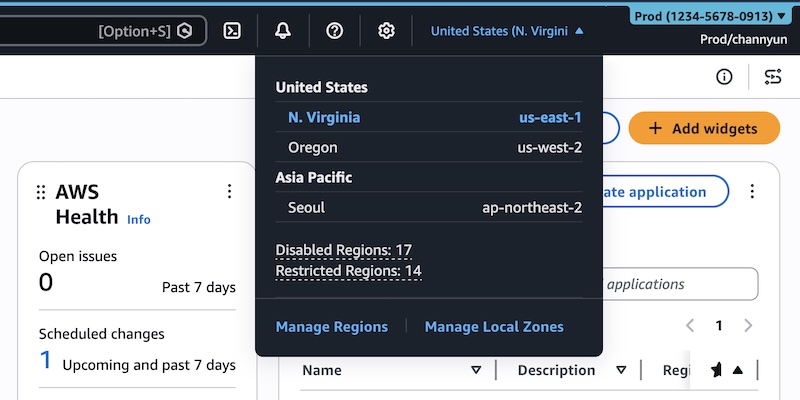
Another customization option is the visibility settings for Regions and services. Users can control which AWS Regions appear in the Region selector and which AWS services are displayed in the console navigation. By selecting only the relevant Regions and services, users can streamline their workflow and access the necessary resources more efficiently. These settings can be configured under the user settings section in the AWS Management Console.
To customize the visibility of Regions, users can edit the visible Regions settings and choose to display all available Regions or select specific Regions to be visible. Similarly, users can set visible services by searching or selecting services from different categories and saving the changes. After configuring the settings, only the selected Regions and services will be visible in the console navigation bar and menu.
It is important to note that these visibility settings only control the appearance of services and Regions within the AWS Management Console and do not restrict access through other tools like the AWS Command Line Interface (CLI) or AWS SDKs. Additionally, users can manage these customization settings programmatically using parameters like visibleServices and visibleRegions in AWS CloudFormation templates.
To learn more about the AWS User Experience Customization API and AWS CloudFormation template references, users can visit the AWS documentation. To try out these customization features in the AWS Management Console, users can provide feedback through the Feedback link in the console or post on the AWS re:Post forum for the AWS Management Console.
Overall, these new customization capabilities in UXC offer users more control over their AWS Management Console interface, allowing for a personalized and efficient user experience. By tailoring the UI components, selecting relevant Regions and services, and managing account settings, users can optimize their workflow and focus on the tasks that matter most.
For more information and to explore these customization features, visit the AWS Management Console today and share your feedback with the AWS community.
For more Information, Refer to this article.