![[Interview] Inside Spatial Signage: How Samsung Brought Glasses-Free 3D Displays to Life](https://www.hawkdive.com/media/samsung-tvs-and-displays-spatial-signage-interview_thumb932-218x150.jpg "Samsung’s Glasses-Free 3D Displays: The Inside Story [Interview]")









Exciting Developments in the World of Gaming: Introducing Gaming Copilot and More
In a significant stride towards enhancing the gaming experience, Microsoft has unveiled the Gaming Copilot (Beta) for Windows PC users, with plans to extend its reach to the Xbox mobile app in the coming month. Designed as a personal gaming assistant, Gaming Copilot promises to resolve in-game challenges smoothly, allowing players to dive back into their favorite games without unnecessary interruptions. The innovation is aimed at overcoming the unique hurdles present in gaming, which often include getting stuck at challenging levels or boss fights.
Gaming Copilot: Your New Best Friend in Gaming
The introduction of Gaming Copilot is largely driven by feedback from the Xbox Insiders and the gaming community at large. This feedback loop has facilitated the integration of new features such as advanced in-game assistance, a user-friendly push-to-talk function for Copilot Voice, and enhanced screen recognition capabilities. Whether you’re grappling with a tough boss fight or searching for your next gaming obsession, Gaming Copilot is equipped to provide insightful recommendations and solutions tailored to your gaming preferences.
For PC users, accessing this feature is straightforward. After ensuring the Xbox PC app is installed, simply press Windows + G to launch the Game Bar and initiate Gaming Copilot. More detailed information and tips on optimizing your experience with Gaming Copilot can be found on the official Xbox news website.
Unified Access to Your Gaming Ecosystem
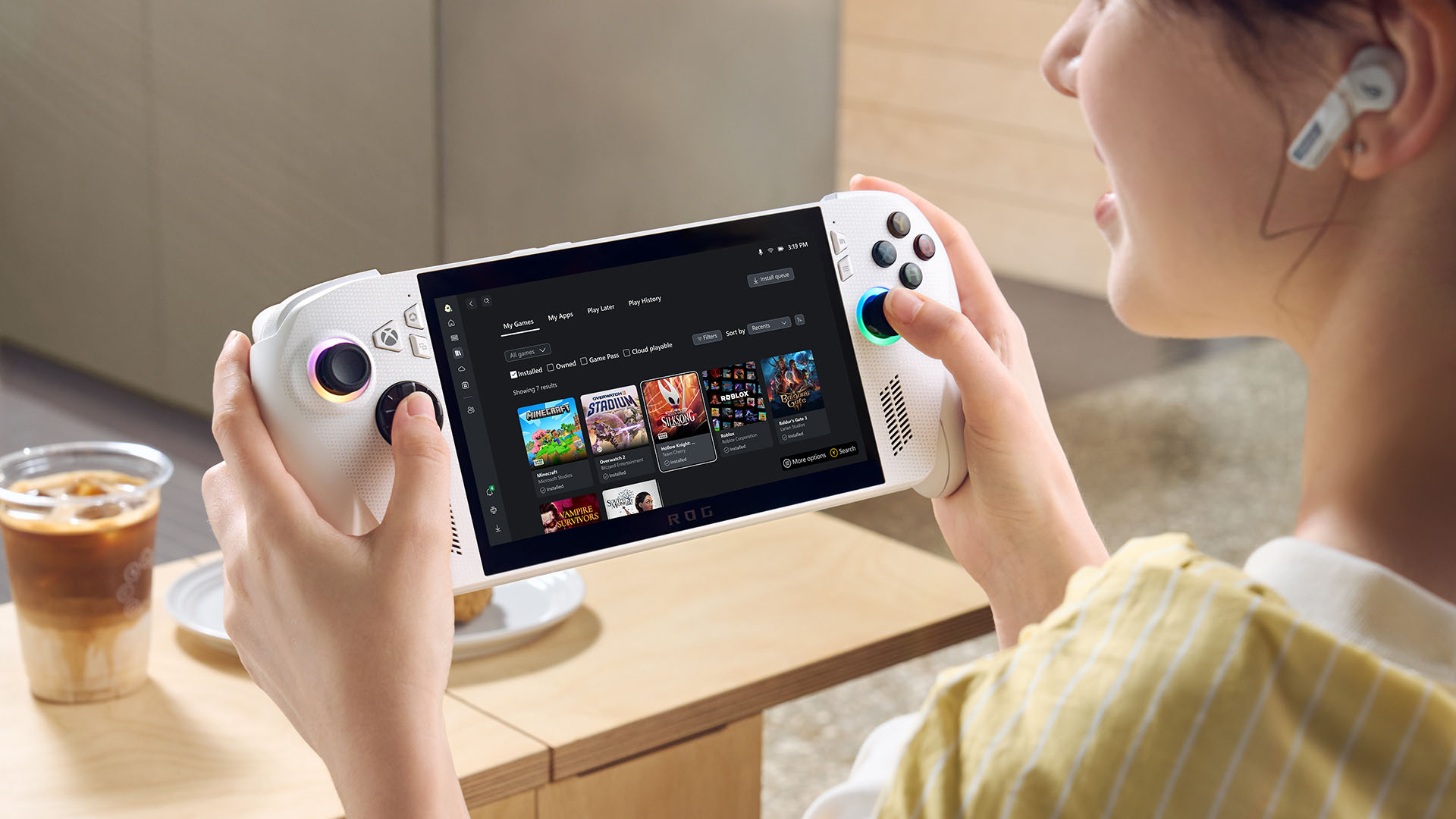
One of the standout features of this update is the enhanced accessibility of your gaming assets. The ‘My Library’ feature now consolidates all your apps and games into one easily navigable space. This means you can effortlessly access third-party apps such as browsers and gaming utilities directly from the Xbox PC app. This consolidation eliminates the hassle of sifting through multiple platforms to find your desired applications.
Further enhancing this experience, the ‘My Games’ section integrates your game collections from Xbox, Game Pass, and installed titles from major PC storefronts. This unified library simplifies the process of browsing and launching games, offering a seamless transition between different gaming experiences. Available on Windows 11 PCs and handheld devices, these features are designed to optimize gaming efficiency, reduce launch times, and minimize unnecessary navigation.
In addition to these features, players can now track their cloud-playable games and gameplay history across devices. This functionality is accessible via the Play history tile on the console’s Home page and the Xbox PC app, ensuring that you can pick up right where you left off, regardless of the device you are using.
Enhancements in PC Gaming Interface
The update extends to the visual aspects of the Game Bar, particularly the Social widgets, which have been refined to offer a more cohesive and aesthetically pleasing interface. This revamp includes both Compact and Desktop Modes, ensuring smoother navigation, particularly with a controller, and enhancing the overall usability of the in-game overlay.
Moreover, a new Network Quality Indicator (NQI) tool has been introduced to the Xbox PC app. This tool is aimed at providing clear insights into your network conditions, helping troubleshoot common streaming issues that may affect your cloud gaming experience. By enabling the network warning icons through your profile settings, players can proactively address connection issues, ensuring a more stable and enjoyable gaming session.
Game Save Synchronization and Rewards System Revamp
The update also addresses the issue of game save synchronization, especially in scenarios where saves might be left on another device. This feature now provides a detailed progress bar, device information, timestamp, and other pertinent details, ensuring players can manage their saves efficiently.
The Rewards hub on PC has undergone a significant overhaul, featuring a sleek new design that adapts to different screen sizes, including handheld devices. The revamped hub simplifies the process of tracking progress, redeeming points, and exploring new gaming opportunities. With the new Goal Card, players can set and monitor their progress towards larger rewards, while the Microsoft Rewards Level view provides a clear overview of your standing and future goals.
For mobile users, the Xbox app now allows for the redemption of Rewards points directly within the app. This functionality streamlines the process of redeeming gift cards and other items, enhancing the overall convenience of the mobile gaming experience.
Innovations in Xbox Console and Cloud Gaming
A notable addition to this update is the introduction of the Offer Wallet, a unified digital wallet solution available on both web and console platforms. This feature allows players to discover, redeem, and manage promotional offers and credits with ease, eliminating the need for manual code entry. Regular updates will introduce new offers, expanding the range of promotions available to Xbox players globally.
In a unique collaboration with LG Electronics, Xbox is expanding its Cloud Gaming (Beta) service to select internet-connected vehicles. This initiative enables gaming on the go, offering more flexibility and choice to players, whether they are waiting for their vehicle to charge or entertaining passengers. By integrating Xbox Cloud Gaming into select vehicles, players can enjoy their favorite titles through the in-vehicle infotainment system, using a compatible Bluetooth controller.
Exclusive Xbox Accessories and Dynamic Backgrounds
The Xbox team has unveiled a series of new accessories, including the Breaker Special Edition Series, which introduces three distinct controller designs: Heart Breaker, Ice Breaker, and Storm Breaker. These controllers feature unique aesthetics, from metallic finishes to translucent elements, catering to players seeking more personalized gaming equipment. Additionally, the release of the Witcher 3 10th Anniversary special edition controller celebrates a decade of the beloved game, featuring designs inspired by iconic elements from the series.
In terms of console updates, Xbox has introduced dynamic backgrounds for Xbox Series X|S consoles, allowing players to personalize their gaming environment in anticipation of upcoming releases like Call of Duty: Black Ops 7 Beta.
Expanding Game Libraries and Accessibility
The Xbox Play Anywhere initiative continues to grow, with over 1,000 games now supporting the program, enabling players to switch seamlessly between PC, console, and handheld devices without additional costs. Recent additions to the program include titles like Acres, Astral Takers, and Gears of War: Reloaded.
Furthermore, the Stream your own game collection in Xbox Cloud Gaming Game Pass Ultimate has expanded to include over 600 games, offering more flexibility for players to stream games they own across various devices. Recently added titles include Borderlands 4 and Kingdom Hearts III, with more games on the horizon.
The Retro Classics collection, in collaboration with Antstream Arcade, brings nostalgic favorites to modern devices, ensuring that classic games remain accessible to new generations of players. With over 1 million players already engaged, the collection continues to grow, offering titles like Space Quest and Dragonfire.
Finally, Xbox has enhanced accessibility by adding mouse, keyboard, and touch controls for more games, catering to diverse player preferences and allowing for a more tailored gaming experience.
Join the Xbox Community and Shape the Future
Xbox remains committed to evolving and improving its platform, and player feedback plays a crucial role in shaping future developments. Gamers are encouraged to join the Xbox Insider Program to gain early access to new features and provide valuable input that helps guide the platform’s direction.
For ongoing updates and support, players can visit the official Xbox Support site. The Xbox community’s enthusiasm and contributions are vital to the continuous growth and enhancement of the gaming experience. Happy gaming!
For more Information, Refer to this article.