






























As businesses increasingly shift towards cloud computing, they encounter several challenges, such as wasted cloud spending, configuration drift, inadequate policy enforcement, and the emergence of shadow IT cloud instances. These issues often become more pronounced as organizations scale their cloud adoption and migration efforts. To address these challenges, Terraform has been instrumental in transforming how organizations manage cloud resources by providing a unified provisioning workflow that supports operational modernization initiatives. However, there is still a demand for additional tools to streamline fragmented workflows and resources into the Terraform ecosystem.
Enter Terraform Search, a new feature that has been integrated into Terraform version 1.14. This tool is designed to tackle the aforementioned challenges by enabling users to discover, audit, and import unmanaged resources into a secure, automated, and unified workflow. Terraform Search allows users to query their cloud environments and bulk-import resources directly into the Terraform state, thus providing a comprehensive solution to improve cloud resource management.
Challenges Leading to the Development of Terraform Search
According to the 2025 HashiCorp Cloud Complexity Report, a staggering 97% of organizations acknowledge struggles with cloud infrastructure, while 98% confront challenges related to cloud-associated costs. The report further highlights that 52% of organizations identify the complexity of operating within hybrid or multi-cloud environments as their biggest hurdle. Among the most common difficulties faced by organizations in managing infrastructure lifecycles are:
Governance of Manually Created Resources (ClickOps)
During the initial phases of public cloud adoption, many organizations performed cloud migrations through a lift-and-shift approach. This involved provisioning resources directly via command-line interfaces (CLI) or through cloud consoles. These resources bypass infrastructure as code (IaC) workflows, lack automation, and often do not have version control, leading to ungoverned resources. This opens the door to security vulnerabilities and unnecessary cloud expenditure.
Cloud Waste
Without centralized visibility or governance, organizations often lose track of what is running within their cloud environment. This can range from obsolete test environments tied to completed projects to idle virtual machines and their associated storage that persist after an application has been decommissioned or updated. Such unused resources can significantly contribute to cloud spending. Past surveys have revealed that up to 91% of respondents were aware of waste within their cloud expenditures. Furthermore, these orphaned resources can pose security risks if left idle with misconfigurations or weak security settings, potentially being exploited by malicious actors.
Configuration Drift
Configuration drift occurs when the actual state of infrastructure components deviates from their intended state. When resources are not managed through IaC, configuration drift becomes inevitable, leading to several risks, such as:
- Untracked Changes: These can introduce vulnerabilities and open up attack vectors within an environment.
- Operational Incidents: Outages and failed deployments become more prevalent due to unexpected configurations or behaviors.
- Compliance Failures: Non-compliance risks escalate when auditors cannot verify that infrastructure matches desired policies.
Lack of Policy Enforcement or Automated Governance
Without IaC, organizations cannot enforce guardrails or automate compliance checks. This allows teams to bypass established controls, increasing risk and reducing visibility throughout environments. Regulatory violations also tend to rise when enforcement mechanisms are not in place to ensure compliance with internal or industry standards.
These issues are prevalent in large-scale cloud environments, making effective management a complex task.
How Terraform Search Addresses These Challenges
Terraform Search is a robust solution to the problems mentioned above. It can be utilized through the HCP Terraform user interface, version control systems (VCS), or CLI-driven workspaces. Terraform Search operates by defining queries through list blocks within the Terraform configuration, which are designed to search for existing resources within an environment.
The
terraform querycommand generates the configuration required to import discovered resources, which includes the necessary resource and import blocks. By copying the generated configuration into the main.tf file and executing theterraform applycommand, desired resources are imported seamlessly. This workflow eliminates the need for manually searching for resources and executing theterraform importcommand for each one, thus establishing a more repeatable and secure process that minimizes errors.Let’s delve into an example to illustrate Terraform Search in practice.
Example: Importing Unmanaged Amazon EC2 Instances Using Terraform Search
This example demonstrates how to search for and import Amazon EC2 instances that are present and managed within the AWS console but not within the Terraform state. Such fragmented and ad hoc management is an anti-pattern, as we aim to have all resources managed within Terraform.
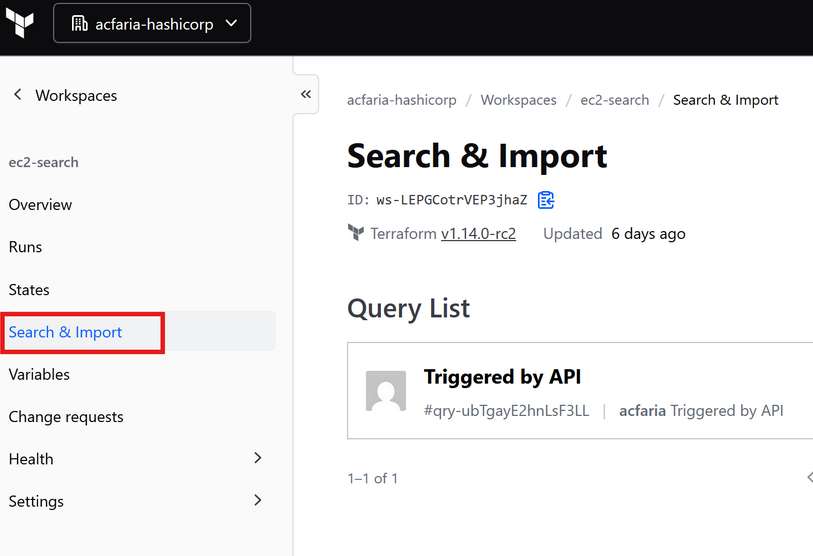
In a workspace using Terraform version 1.14 or greater, users can access a new "Search & Import" option visible within the left navigation pane. For the purpose of this example, we will perform a CLI-driven run to showcase the necessary HCL for this import exercise.
In the Terraform configuration associated with this example workspace, a query is defined using list blocks within a
search.tfquery.hclfile. The list block specifies arguments such as the provider configuration Terraform should use to perform the query and a config block that defines provider-specific arguments to build the query itself.hcl<br /> list "aws_instance" "unmanaged" {<br /> provider = aws<br /> <br /> config {<br /> region = "us-east-2"<br /> <br /> filter {<br /> name = "tag:ManagedBy"<br /> values = ["unmanaged"]<br /> }<br /> <br /> filter {<br /> name = "instance-state-name"<br /> values = ["running"]<br /> }<br /> }<br /> }<br />This example instructs Terraform to search for all running EC2 instances in the AWS us-east-2 region with a
ManagedBytag value of "unmanaged."Queries can be tailored to other use cases as well. For more information on query configurations, refer to the Import resources in bulk page on the HashiCorp Developer site.
With the Terraform query defined, users can execute the
terraform querycommand. The results are displayed within the CLI and the HCP Terraform UI. Users can review the details for each unmanaged resource and generate a starter configuration by selecting which resources to import into the Terraform state and clicking the "Generate Starter Configuration" button.The required Terraform import and resource blocks are generated within the HCP Terraform UI. After reviewing the generated HCL code, users can import the unmanaged resources into the Terraform state by copying the starter configuration output into the
main.tffile of their workspace and making any necessary modifications. They can then run aterraform applycommand to complete the import process.Note that for certain resources with complex schemas, Terraform may not be able to construct a valid configuration from those values. Modifications to the default starter configuration may be necessary before importing resources. For more details, refer to the limitations section of the Import existing resources page on the HashiCorp developer site.
Using Terraform MCP Server to Generate Search Config
An interesting use case for Terraform Search is leveraging the Terraform MCP server to assist developers in writing more accurate and relevant Terraform configurations tailored to their organizational needs. With the latest Terraform release, users can generate Terraform Search configurations by prompting their favorite MCP-supporting generative AI tool with queries like:
“Can you help me import and manage unmapped ‘aws_instance’ resources with the tag ‘unmanaged’ using Terraform search while also using X module(s) within my organization’s HCP Terraform private registry?”
This allows unmanaged resources to be imported into Terraform while ensuring that organizational best practices and patterns are followed through approved module usage.
Cleanup
If you have been following along by importing and deploying your test resources, it is essential to run the
terraform destroycommand to clean up your environment and avoid incurring unwanted costs.Conclusion
This post demonstrates how Terraform Search can help reduce cloud waste, enhance security, and improve resource governance across your cloud estate by bulk-importing previously unmanaged resources into your Terraform state. This facilitates centralized visibility and governance of your cloud environment.
As of the time of writing, Terraform Search supports only a select group of resources within the AWS Terraform provider. Additional provider and resource support will be made available in future releases.
For more information on Terraform, visit the HashiCorp Developer site, where you can access resources on best practices, integrations, and reference architectures.
For more Information, Refer to this article.







