








In the evolving landscape of artificial intelligence (AI), the Model Context Protocol (MCP) was heralded as a groundbreaking solution, likened to the "USB-C for AI applications." It was envisioned as a universal standard that would allow AI agents, such as ChatGPT, Claude, and GitHub Copilot, to safely and seamlessly connect to various tools and services. By creating a standardized bridge between AI applications and the real world, MCP aimed to facilitate tasks ranging from reading emails and updating databases to managing Kubernetes clusters and sending Slack messages.
However, as explored in the initial part of our series, this promise has been overshadowed by significant security challenges. In this continuation, we delve into a critical OAuth vulnerability within the MCP infrastructure, specifically in the mcp-remote component. This vulnerability led to credential compromises and remote code execution across numerous AI development environments.
Today’s Security Breach: A Devastating Supply Chain Attack
In this segment, we focus on CVE-2025-6514, a severe vulnerability that transformed mcp-remote, a widely trusted OAuth proxy, into a potential vector for remote code execution. This breach affected over 437,000 environments, marking it as the first documented instance of complete system compromise via the MCP infrastructure. Organizations utilizing platforms like Cloudflare, Hugging Face, and Auth0 were among those impacted.
Through this exploration, readers will gain insights into:
- The transformation of a simple OAuth configuration into a system-wide security breach.
- The specific attack techniques that bypass traditional security controls.
- How containerized MCP servers can prevent such attacks.
- Practical steps to enhance the security of AI development environments.
The Importance of This Series
Each "Horror Story" in this series is a detailed examination of a real-world security incident that transitions from theoretical vulnerabilities to practical disasters. These documented cases highlight how vulnerabilities identified in MCP can be exploited, causing significant disruptions for organizations and developers.
Our objective is to shed light on the human impact behind these statistics, illustrate how the attacks unfold in practice, and offer tangible guidance on securing AI development infrastructure through Docker’s security-focused approach to MCP deployment.
The narrative begins with a seemingly routine task for developers: configuring their AI client to connect to a new tool.

Understanding the Problem
In July 2025, JFrog Security Research identified CVE-2025-6514, a critical vulnerability in mcp-remote. This flaw affected how AI tools like Claude Desktop, VS Code, and Cursor connect to external services, earning a devastating CVSS score of 9.6 out of 10. It represents the first documented case of full remote code execution within an MCP client in a real-world setting.
The Magnitude of the Problem
The ramifications of this vulnerability are extensive. The mcp-remote package has been downloaded over 437,000 times, turning this flaw into a supply chain attack that impacts hundreds of thousands of AI development environments. Its presence in integration guides from major platforms such as Cloudflare, Hugging Face, and Auth0 underscores its widespread adoption across enterprises.
The Mechanics of the Attack
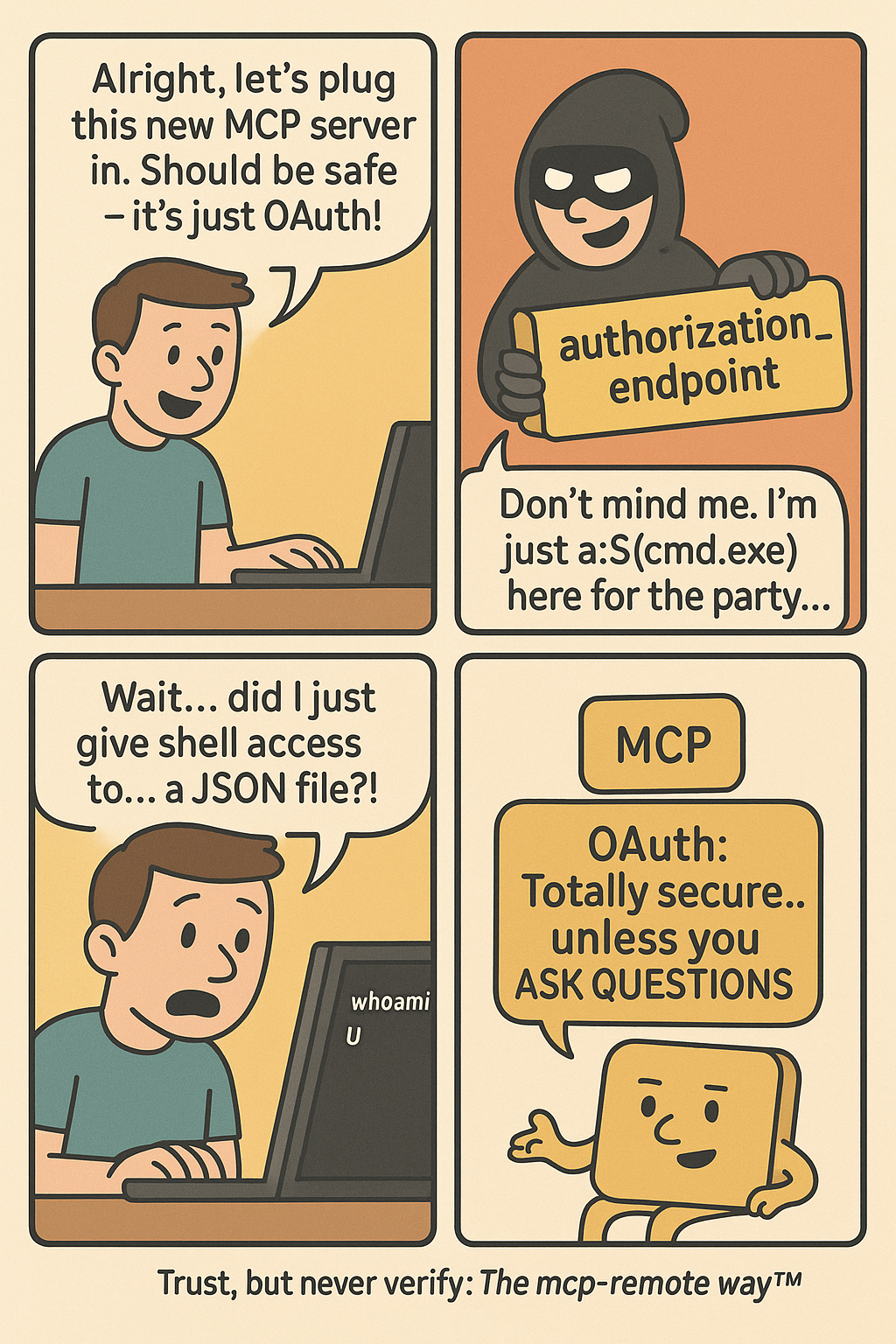
The vulnerability exploited in mcp-remote arises from its trust in server-provided OAuth endpoints without validation. An attacker can craft a malicious authorization URL that executes directly on the system’s shell. When configuring an AI client to use a new tool, the client inherently trusts the tool’s server to operate correctly. CVE-2025-6514 demonstrates the peril of misplaced trust.
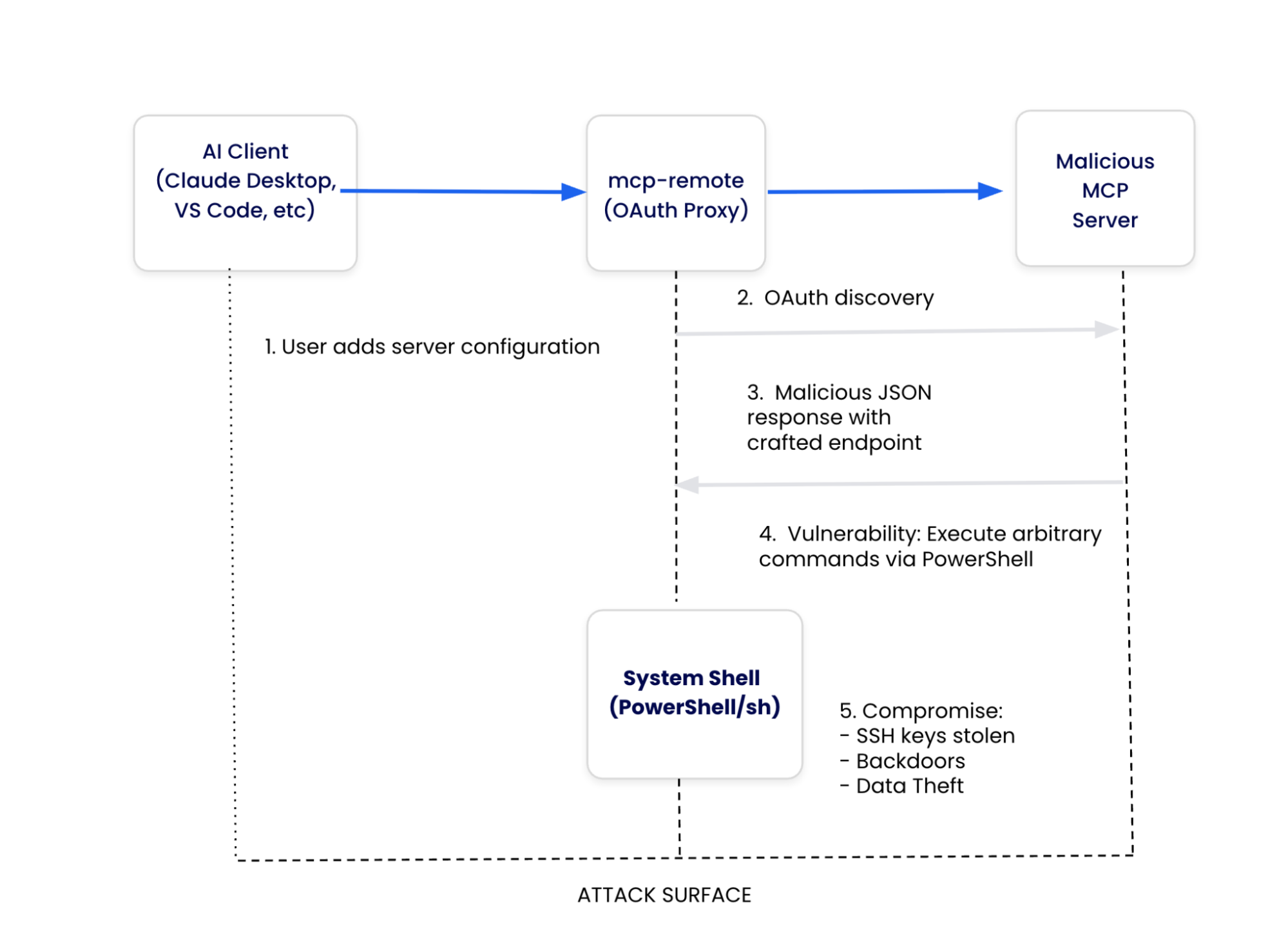
To comprehend how this vulnerability emerged, we must examine the architecture of the Model Context Protocol and pinpoint the design decisions that allowed this attack vector to develop.
- MCP Client: Represents AI applications that receive user prompts and coordinate API calls. In the case of CVE-2025-6514, the client becomes an involuntary participant by executing OAuth flows without endpoint security validation.
- mcp-remote (Third-Party OAuth Proxy): Serves as the critical vulnerability point, acting as a bridge to address OAuth limitations. While it handles OAuth discovery and processes server-provided metadata, its indiscriminate trust in these endpoints creates a pathway for system compromise.

- Communication Protocol: Carries JSON-RPC messages, including malicious OAuth metadata that triggers the vulnerability, lacking built-in validation mechanisms to detect command injection attempts.
- System Integration: Connects mcp-remote to operating system services, enabling arbitrary code execution through system handlers when malicious endpoints are processed.
In the fourth step of this process, mcp-remote receives OAuth metadata from the server and passes authorization endpoints directly to the system without validation.
Technical Breakdown of the Attack
Here’s how a developer’s machine and data become compromised:
Legitimate Setup
Developers follow standard procedures to configure their LLM host, such as Claude Desktop, to connect to a remote MCP server by editing configuration files to include an mcp-remote command with the server’s URL.
OAuth Discovery Request
Upon restarting the application, mcp-remote queries the server for OAuth metadata.
Malicious Response
A compromised server responds with malicious OAuth configuration, exploiting the fact that non-existing URI schemes do not get URL-encoded. This allows the execution of PowerShell commands.
Code Execution
The mcp-remote processes these as OAuth endpoints and attempts to open them in a browser. This results in the execution of Windows protocol handlers, leading to arbitrary command execution with user privileges.
The Consequences
Within moments, an attacker gains:
- Control over the development machine.
- The ability to execute arbitrary commands.
- Access to environment variables and credentials.
- Potential access to the company’s internal repositories.
How Docker MCP Toolkit Mitigates This Threat
The current MCP ecosystem presents a challenging trade-off between convenience and security. Executing arbitrary code directly on host systems exposes the entire file system, network connections, environment variables, and system resources to potential threats.
Docker’s MCP Toolkit represents a paradigm shift towards security as the default approach. Instead of patching individual vulnerabilities, Docker has developed a new model that inherently eliminates entire classes of attacks. This approach has garnered significant adoption, underscoring the demand for secure MCP server execution.
Docker’s Security-First Architecture
Docker MCP Catalog and Toolkit eliminate the root causes of CVE-2025-6514 by removing vulnerable architectures entirely. Unlike npm packages that can be compromised, Docker MCP Catalog and Toolkit offer:
- Cryptographic verification to ensure image integrity.
- Transparent build processes for Docker-built servers.
- Continuous security scanning for known vulnerabilities.
- Immutable distribution through Docker Hub’s secure infrastructure.
Eliminating Vulnerable Proxy Patterns
Native OAuth Integration
Docker Desktop handles OAuth directly, eliminating the need for vulnerable proxies.
No More mcp-remote Proxy
Docker provides containerized MCP servers, removing the risk of proxy vulnerabilities.
Container Isolation with Security Controls
While containerization alone doesn’t prevent CVE-2025-6514, Docker MCP enhances security through container isolation and other measures.
Secure Secret Management
Docker MCP uses Docker Desktop’s secure secret store, protecting secrets from exposure.
Network Security Controls
Docker MCP enforces zero-trust networking, allowing only pre-approved connections.
Real-Time Threat Protection
Docker MCP actively monitors and prevents threats, blocking secret exfiltration and resource exhaustion attacks.
Best Practices for Secure MCP Deployment
- Opt for Docker-built servers.
- Transition away from mcp-remote to containerized MCP servers.
- Implement security controls like network and secret blocking.
- Verify images for supply chain security.
- Set resource limits to prevent attacks.
- Monitor tool calls for audit trails.
- Regularly update the Docker MCP Toolkit.
Taking Action: Secure Your AI Development
To enhance the security of your MCP development, consider these steps:
- Opt for Docker-built servers.
- Explore the Docker MCP Catalog to find secure, containerized MCP servers.
- Install Docker Desktop to run MCP servers in isolated containers, mitigating security risks.
- Contribute to the secure ecosystem by submitting your MCP server to the Docker catalog.
Conclusion
CVE-2025-6514 highlights the urgent need for fundamental security improvements within the MCP ecosystem. By containerizing MCP servers and eliminating vulnerable proxies, Docker MCP Toolkit not only addresses this specific vulnerability but also prevents a wide range of host-based attacks. Stay tuned for our next installment, where we will examine how GitHub’s official MCP integration became a vector for private repository data theft.
For further information and updates, visit the Docker MCP Catalog and consider downloading Docker Desktop. Join the movement towards a secure AI tool distribution by submitting your server and contributing to the Docker MCP ecosystem.