






























The New Era of Gaming: An Introduction to Gaming Copilot on Game Bar
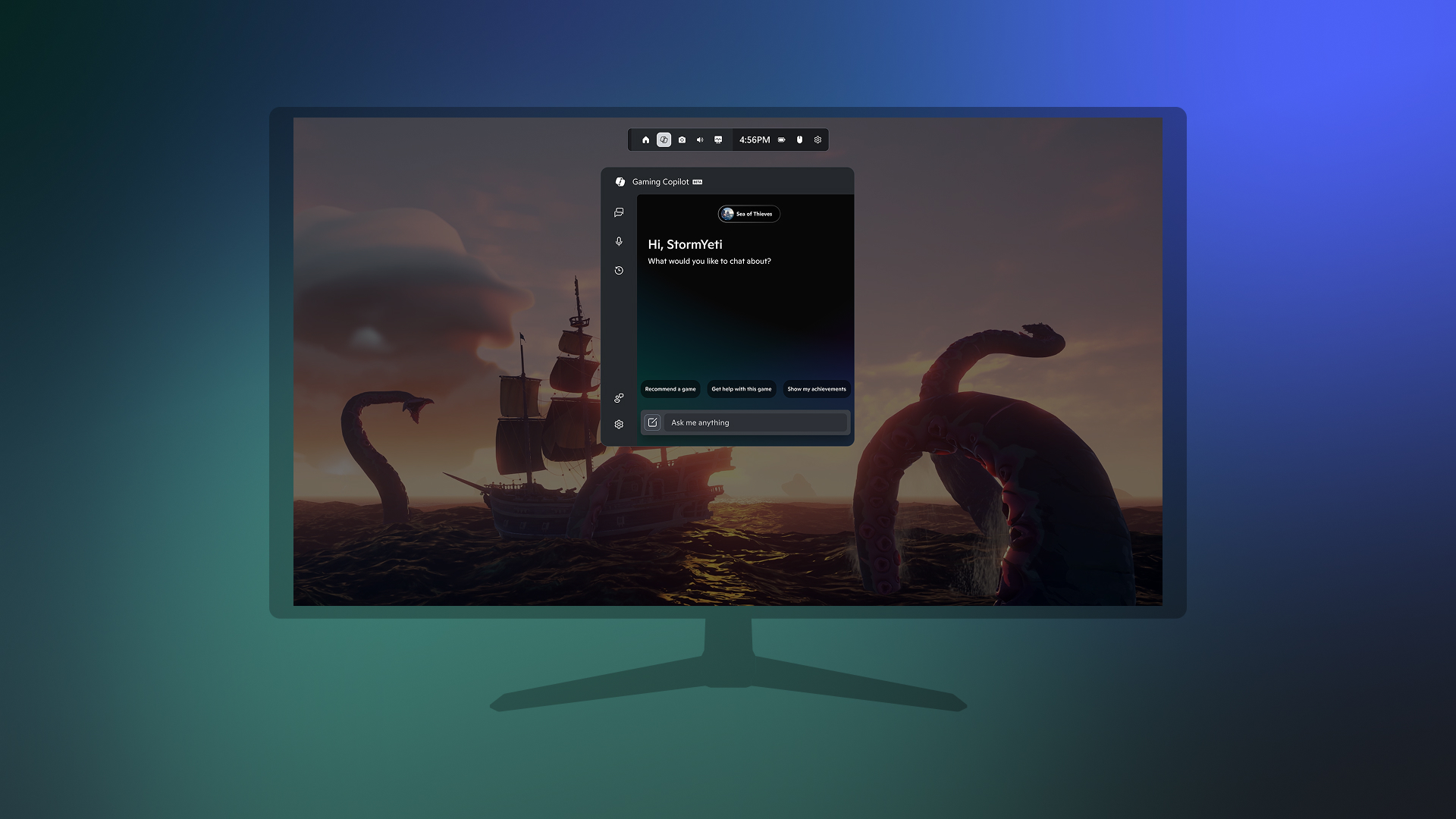
Gaming enthusiasts and Xbox Insiders, rejoice! Microsoft has unveiled a revolutionary tool set to change the way we play and experience games on Windows PCs. Introducing Gaming Copilot (Beta), the innovative gaming companion now available on Game Bar for members of the Xbox Insiders program. Designed to enhance your gaming experience, Gaming Copilot is here to assist you in overcoming in-game challenges, enabling you to spend more time immersed in your favorite games.
Gaming is a unique form of entertainment where players often face complex challenges and obstacles. Unlike movies or music, getting stuck in a game can halt your progress and diminish enjoyment. Recognizing this, Microsoft developed Gaming Copilot to act as your virtual sidekick, providing seamless and personalized support. Whether it’s offering tips to improve your skills or simply staying out of your way when you’re on a roll, Gaming Copilot ensures a more streamlined gaming journey.
Expanding Horizons: Gaming Copilot on Handheld Devices
While currently accessible on Windows PCs, Gaming Copilot is also available in a limited capacity on Windows handheld devices for Xbox Insiders. As the release of ROG Xbox Ally and ROG Xbox Ally X approaches, Microsoft is working diligently to optimize the Copilot experience on handhelds. This marks a significant step towards creating a more versatile gaming ecosystem, where players can enjoy consistent support across various devices.
Enhancing Mobile Gaming: The Xbox Mobile App Integration
In a recent development, Microsoft introduced an early test version of Gaming Copilot within the Xbox mobile app. This integration allows players to access Copilot on a secondary screen without detracting from their primary gaming experience. The ongoing efforts to expand Gaming Copilot’s capabilities and reach reflect Microsoft’s commitment to delivering a comprehensive gaming assistant that evolves with player needs.
With the latest rollout of Gaming Copilot on Game Bar, players can enjoy a more integrated gaming experience. The Copilot is now directly embedded within the PC gaming environment, accompanied by a host of new and exciting features designed to elevate gameplay.
Personalized Gaming Assistance at Your Fingertips
One of the standout features of Gaming Copilot is its ability to tailor its assistance based on your gaming preferences. By understanding what you’re playing and tracking your Xbox activity, Copilot offers an experience centered around your individual needs. Whether you need help with a tricky level, want to explore new games, or have questions about your account, Gaming Copilot is ready to assist.
Noteworthy Features of Gaming Copilot on Game Bar
- Voice Mode for Seamless Interaction: Engage with Gaming Copilot using Voice Mode while playing any game on your PC. By pinning the Copilot widget, you can converse with Copilot without interrupting your gameplay. Simply navigate to the Gaming Copilot widget, select the microphone icon from the navigation bar, and start a conversation. This feature ensures you receive timely assistance while maintaining focus on the game.
- Enhanced Understanding and Responses: Gaming Copilot can now leverage screenshots of your gameplay to provide more accurate responses. By understanding what’s happening on your screen in real-time, Copilot can offer relevant guidance without requiring detailed descriptions. This feature enhances the overall gaming experience by providing context-aware support.
- Endless Possibilities and Future Enhancements: Gaming Copilot encourages players to explore its potential through both text and voice interactions. Future updates promise deeper personalization, proactive coaching, and a host of other features designed to enrich your gaming experience.
Getting Started with Gaming Copilot on Game Bar
To take advantage of Gaming Copilot, ensure you have the Xbox PC app installed on your Windows device. Open Game Bar by pressing the Windows logo key + G, then look for the Gaming Copilot icon in the Home Bar. Log into your Xbox account to unlock the full experience.
Currently, this early preview of Gaming Copilot on Game Bar is available in English for Xbox Insiders aged 18 and older in regions including the U.S., Australia, New Zealand, Japan, and Singapore. For a complete list of regions where early testing is available, refer to the official Xbox website.
Continuous Improvement Through Feedback
Microsoft is committed to refining Gaming Copilot based on user feedback. Xbox Insiders play a crucial role in shaping this feature, and your input is invaluable. Share your feedback directly within the Gaming Copilot experience by selecting "Give Feedback" or by rating Copilot’s responses with a thumbs up or down.
Join the Xbox Insider Community
For Xbox Insiders seeking support or wishing to share feedback, the Xbox Insider subreddit is a valuable resource. Official Xbox staff, moderators, and fellow Insiders are available to assist, and engaging with existing threads ensures efficient support.
Final Thoughts
Gaming Copilot represents a significant leap forward in the realm of gaming assistance. By seamlessly integrating into the Game Bar, it offers personalized support, advanced features, and a glimpse into the future of gaming. As Microsoft continues to innovate and expand this tool, players can look forward to a more immersive and enjoyable gaming experience.
For more information and updates, visit the official Xbox Wire page.
For more Information, Refer to this article.







