






























Title: Apple Unveils New Software Updates with Enhanced Features and a Fresh Design
Date: September 15, 2025
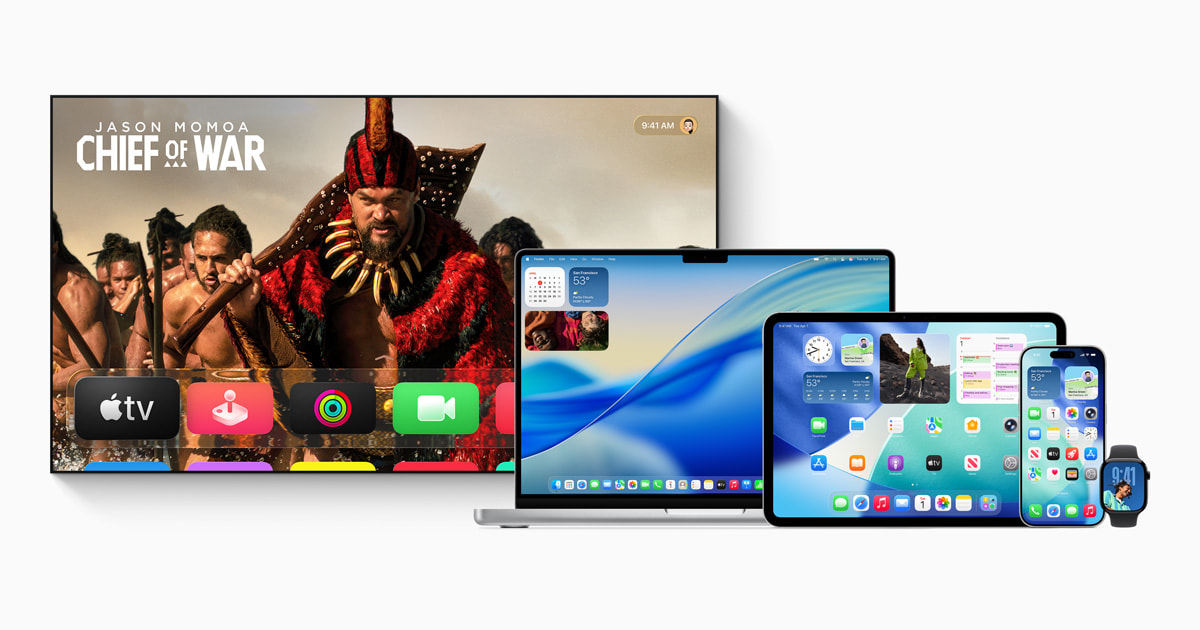
Apple has rolled out the latest versions of its software platforms, including iOS, iPadOS, macOS, watchOS, tvOS, and visionOS, promising users a more integrated and dynamic experience. This update introduces a refined design and a suite of innovative features that enhance functionality across the Apple ecosystem.
Liquid Glass: A Revolutionary Design Element
The new software update is highlighted by the introduction of a stunning design element known as Liquid Glass. This innovative feature brings a sense of vitality and consistency across Apple’s operating systems while maintaining their unique qualities. Liquid Glass is a translucent material that reflects and refracts its surroundings, dynamically adapting to focus on content, making the user interface more engaging and expressive.
Advancements in Apple Intelligence
The update also introduces new capabilities under the Apple Intelligence umbrella. These enhancements aim to improve communication across languages with the Live Translation feature available in Messages, FaceTime, Phone, and AirPods. This tool enables seamless conversations across multiple languages, breaking down language barriers in real-time.
Apple Intelligence also takes visual interaction to the next level. Users can now take screenshots and receive insights by querying ChatGPT, allowing them to explore content more deeply. Additionally, the new Genmoji feature lets users combine multiple emojis, while the Image Playground uses AI to create new image styles.
The Workout Buddy on Apple Watch provides personalized audio insights during exercises, motivating users with a voice generated from Apple Fitness+ trainers. This feature underscores Apple’s commitment to integrating health and technology.
Developers can now directly access Apple Intelligence models to enhance their applications with intelligent, privacy-focused features. Apps like Streaks, CARROT Weather, and Detail: AI Video Editor demonstrate this integration by offering users intelligent task management, conversational weather insights, and script generation for video content.
iOS 26: Enhanced Customization and Functionality
The iOS 26 update brings a host of new features aimed at improving user experience. The Lock Screen now offers more customization options, including adaptive time display and 3D spatial scenes. Call Screening and Hold Assist help manage incoming calls, while new features in Messages allow users to screen messages from unknown senders, create polls, and add conversation backgrounds.
Additionally, iOS 26 introduces Lyrics Translation and Pronunciation in Apple Music, Visited Places in Apple Maps, and order tracking in Apple Wallet. The new Apple Games app serves as a personalized gaming hub, making it easier for users to find and enjoy their favorite games.
iPadOS 26: Unleashing the Power of iPad
With its biggest update yet, iPadOS 26 enhances productivity on the iPad with a powerful new windowing system. This feature allows users to control, organize, and switch between apps effortlessly. The introduction of a menu bar and an upgraded Files app further simplifies file management.
Creative professionals will appreciate the Background Tasks feature, which offers more control over audio input and high-quality local capture recordings. The Journal app also debuts on iPad, enabling users to document everyday moments with ease using Apple Pencil or touch.
macOS Tahoe: Boosting Mac Productivity
macOS Tahoe enhances the Mac experience with a sleek new design and features that boost productivity. The updated Control Center, new folder color options, and a transparent menu bar provide users with more ways to personalize their Mac.
Spotlight receives its most significant update, offering new browsing views, enhanced search capabilities, and powerful action features for tasks like sending emails or creating events. Continuity enables seamless phone call management and integration with iPhone features, while Live Activities keep users informed about real-time events directly on their Mac.
watchOS 26: Personalized Health and Connectivity
Apple Watch users will find watchOS 26 to be a game-changer, offering more personalized health insights and connectivity options. A new sleep score feature provides insights into sleep quality, while FDA-cleared hypertension notifications alert users to potential health risks.
The redesigned watch face gallery introduces new faces, and the Workout Buddy feature offers motivational audio insights during workouts. Smart Stack hints and Live Translation in Messages further enhance the user experience, making daily interactions more convenient.
tvOS 26: Elevating Home Entertainment
tvOS 26 transforms the Apple TV experience with new design elements and engaging features. Sing-along sessions in Apple Music become more interactive, with users turning their iPhones into wireless microphones. FaceTime updates make it easy to connect with friends and family from the comfort of the living room, and profile updates provide quick access to personalized recommendations.
visionOS 26: Expanding Spatial Experiences
visionOS 26 introduces groundbreaking spatial experiences for Apple Vision Pro. Widgets integrate seamlessly into users’ spaces, enhancing interaction with their surroundings. New spatial scenes and browsing capabilities offer lifelike depth for photos and articles, enriching the viewing experience.
Users can also share Vision Pro experiences with others in the room, fostering collaboration and entertainment. The new interactive Environment, Jupiter, offers a unique perspective on the planet’s storms, while support for 180-degree and 360-degree content playback enhances action camera footage viewing.
Accessibility Enhancements for Greater Customization
Apple’s commitment to accessibility is evident in the new features designed to assist users with disabilities. Accessibility Nutrition Labels inform users about supported features before downloading apps, while the Magnifier app for Mac aids those with low vision. Accessibility Reader and Braille Access provide enhanced reading and interaction options for visually impaired users, and Live Listen controls on Apple Watch bring new features for the deaf and hard of hearing.
In conclusion, Apple’s latest software updates offer users a more seamless and integrated experience across its ecosystem. With enhanced design elements, advanced intelligence features, and a focus on personalization and accessibility, these updates set the stage for a more connected and intuitive user journey. Users can access these updates today, with certain features varying by region and language. For more information, users can visit Apple’s official support page.
For more details, visit Apple’s Newsroom.
For more Information, Refer to this article.







