





























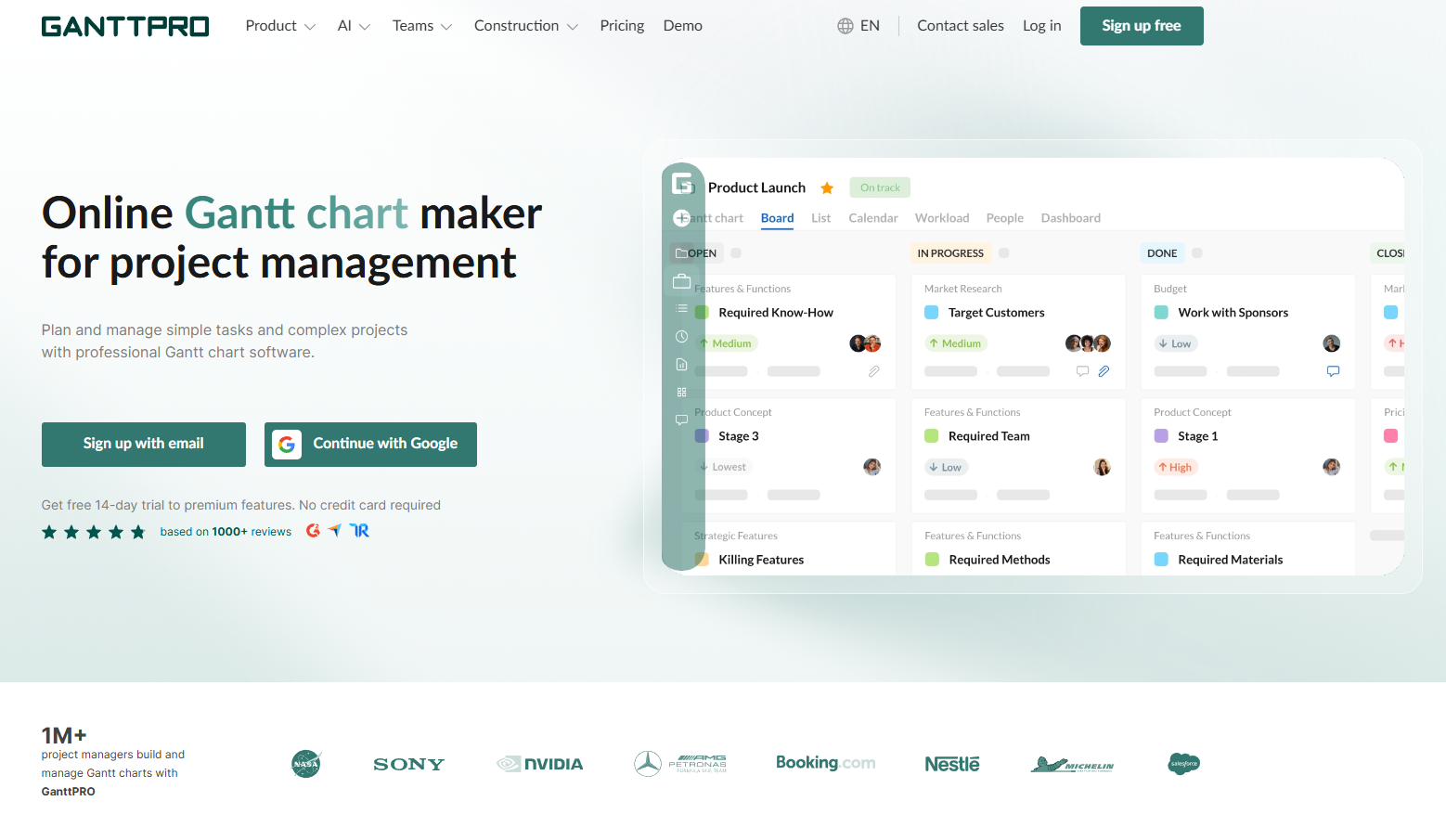
Planning a project in a spreadsheet works fine until the dates start to move. One late task pushes five others, and you lose an afternoon fixing cells. GanttPRO is an online tool made to solve exactly that. It shows your plan as a Gantt chart, which is a timeline where every task is a bar, and it updates the dates when something changes. In this review, we look at what GanttPRO does, which features stand out, who it suits, what it costs, and where it falls short.
GanttPRO at a Glance
| Best for | Teams and managers who plan work with deadlines, dates, and linked tasks |
| Works on | Any web browser on Mac, Windows, and Linux, plus iOS and Android apps |
| Starting price | $7 per user per month, billed annually (Core plan) |
| Free trial | 14 days, no credit card required |
| Standout features | AI Project Planner, critical path, baselines, Microsoft Project file import |
| Main limits | No offline editing, and workload, budget, and time tracking need the Business plan |
What Is GanttPRO?
GanttPRO is a project management tool built around an intuitive Gantt chart. It allows for planning projects from A to Z. You can easily create tasks and subtasks, set start and end dates, add deadlines, define dependencies and milestones, assign resources, communicate with your team and external stakeholders, and track progress. All without switching to other services. The platform is used by over a million project managers in the world. It has a 4.8-star rating based on more than 1,000 reviews on platforms like G2, Capterra, and TrustRadius.
The software is available on any computer, whether it’s running macOS, Windows, or Linux, because it runs directly in a web browser. You can work from anywhere with mobile apps for iOS and Android.
Key Features of GanttPRO
Gantt charts and timeline-based planning
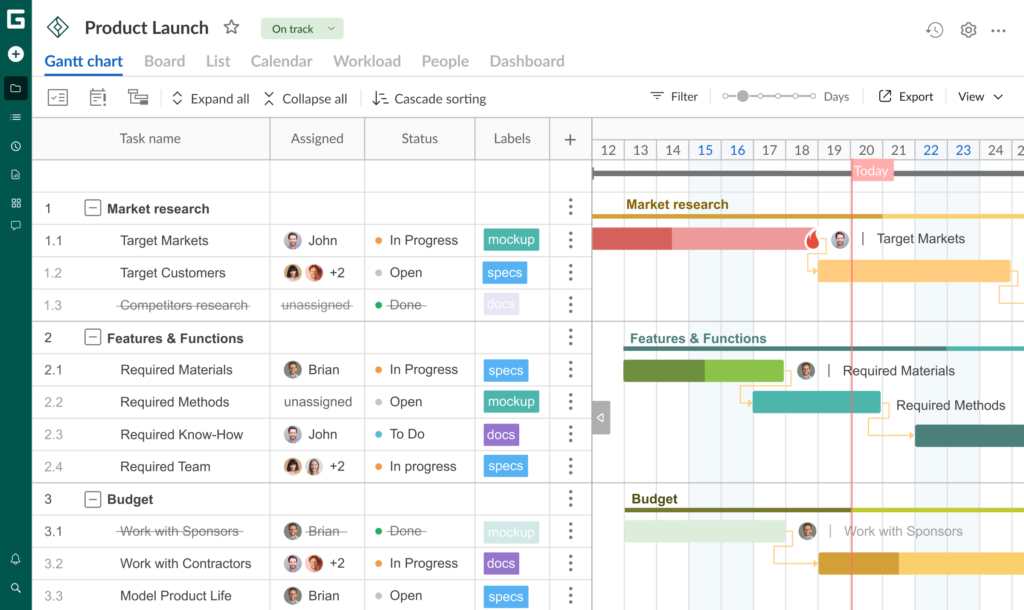
A Gantt chart is a core feature of GanttPRO. It allows users to break projects down into groups of tasks and subtasks, specifying a start date and duration for each. The system then automatically generates a project plan. You can also add milestones to mark significant events, key tasks, or specific dates. A project calendar can be customized to account for working days, hours, and breaks. Progress on each task is easily tracked as a percentage.
Task dependencies and automated scheduling
Dependencies are represented as logical links on a timeline, showing the relationship between different tasks. For instance, when one task cannot begin until another is completed. The platform supports four types of dependencies and allows you to define time intervals between tasks. With automated scheduling, the system recalculates the dates of linked tasks whenever any changes are made, meaning you don’t have to manually shift every individual element on the chart.
Project views
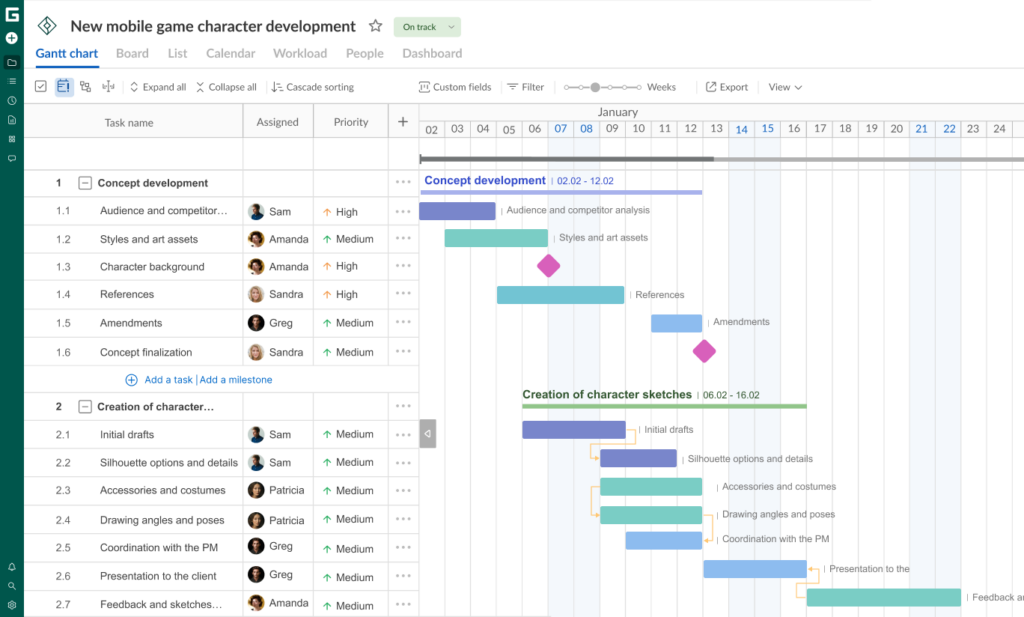
Project teams all over the world rely on Gantt charts. But many users like other ways to visualize their projects. GanttPRO also includes a board view to move cards between columns, as well as list, dashboard, and calendar views. If you’re working on many projects at the same time, the portfolio view lets you see the status of each project in one window.
Critical path
Plotting the critical path on a timeline enables teams to see the sequence of tasks that need to be accomplished so they can know when the project will be finished. If the deadline on any of these tasks moves, so does the entire project timeline. The tool can also automatically show the critical path, without manual computation.
Baselines and the history of changes
If you need to save a copy of your original timeline, you can use the “Baseline” feature. You can compare this baseline against your current plan to see where you are ahead of or behind schedule. The system allows you to save multiple baselines at different stages of your work. Furthermore, GanttPRO maintains the history of changes. It enables you to revert to an earlier version of your project at any time.
Workload and resources
You can monitor workload to see how busy each person is. In GanttPRO, you can see it in hours or in the number of tasks. If a person is overloaded, you can shift work to another team member who has spare capacity. Unlimited virtual resources are included in all subscription plans.
Collaboration and data sharing
Strong collaboration is a critical component for any project. GanttPRO users can attach files to tasks, leave comments, tag each other, and receive email and push notifications. All changes are updated in real time. Clients can view a project plan via a private link you generate, so they don’t need to have an account. Data can also be exported to PDF, PNG, Excel, and XML formats.
Time tracking, budgeting, and reporting
GanttPRO offers comprehensive features for time tracking and budget management. Teams can use a timer for specific tasks or log time spent after the fact. You can assign costs to individual tasks or resources to monitor the project budget, as well as compare planned costs against actual expenditures based on the time logged.
Templates and import
Ready-made templates are an excellent option for a quick start. In GanttPRO, you can find pre-built, standard timelines for spheres such as software development, construction, marketing, event planning, education, web design, and many others. You can also import existing plans from Excel files (.xlsx or .csv), Microsoft Project (.mpp), or Jira Cloud.
What Makes GanttPRO Different?
AI Project Planner and AI Gantt chart maker
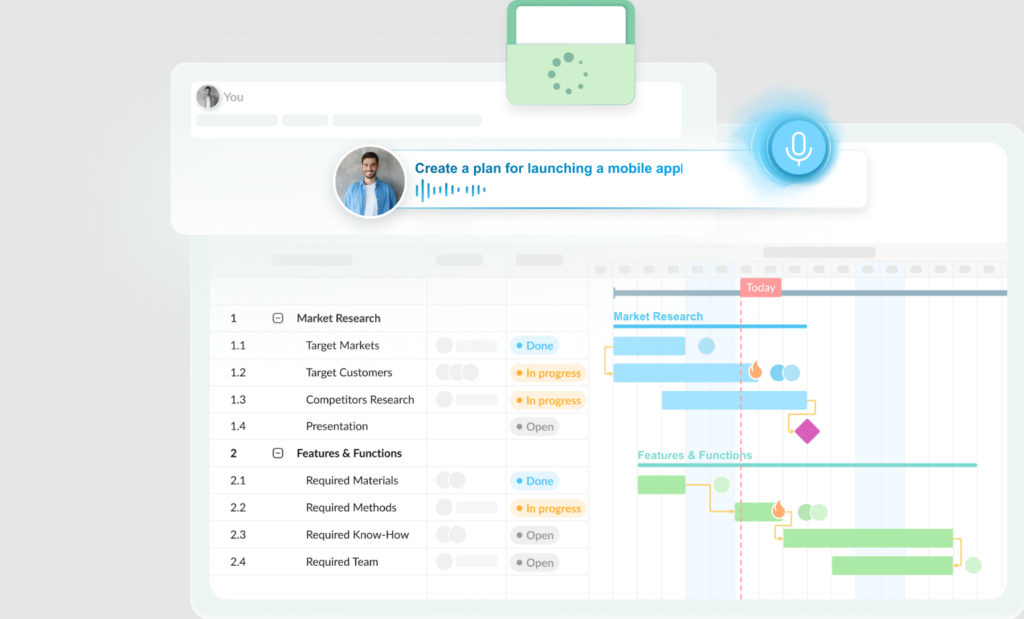
The AI Project Planner allows you to create professional project management plans from scratch. Simply describe your project – via text, voice, by uploading files (PDF, Word, Excel), or even by providing a photo of a whiteboard with notes – and GanttPRO will generate a draft plan, including tasks, timelines, phases, dependencies, milestones, and roles.
Users are also fond of a dedicated AI Gantt chart maker that lets them create a fully functional Gantt chart from a short description in a matter of minutes – complete with tasks, milestones, and dependencies too.
You can always edit such generated plans. It’s possible to make changes by describing them in your own words. Every AI-driven change is saved as a new version, so you can always go back to an earlier iteration. Any data you have entered yourself, such as task names or dates, stays the same. It will alert you if the system makes any assumptions and ask you no more than three questions to clarify.
These smart AI tools in GanttPRO are available for free during the 14-day trial period and included in all paid subscription plans.
Open Microsoft Project files without having Microsoft Project installed
A key feature that many teams use is the ability to open Microsoft Project (.mpp) files without having the software installed.
Do it in your browser, in a few minutes, hassle-free, with GanttPRO. The platform supports files created in MS Project 2003, MS Project 2007, MS Project 2010, MS Project 2013, MS Project 2016, and MS Project 2019. To begin, simply sign up for a free account. GanttPRO supports the import of tasks, task dependencies, and the standard project calendar, and assigned resources are converted to virtual resources.
Please note that custom calendar settings (such as holidays), task descriptions, comments, and attachments are not imported. Therefore, it’s recommended that you review your project plan after uploading the file.
Does GanttPRO work on Mac?
Yes, GanttPRO works on Mac. You can access it via a standard web browser (such as Safari or Chrome) on macOS. No software installation required.
Keep in mind, however, that this is a web-based solution rather than a native Mac app. Its behavior may differ from that of standard applications designed specifically for this operating system.
You can also use GanttPRO on the go with mobile apps for iOS and Android. These are designed for managing tasks, tracking time, adding comments, and receiving notifications while you’re away from your desk. All your data is synchronized with the web version in real time.
Integrations
GanttPRO connects to the tools many teams already use:
- Slack and Microsoft Teams: get notifications and send commands to GanttPRO from your chat channels.
- Google Drive and OneDrive: attach files to tasks.
- Jira Cloud: import projects from Jira. This needs the Business plan or higher.
- Microsoft Project and Excel: import .mpp, .xlsx, and .csv files.
- Open API: connect GanttPRO to your own business processes.
Who Should Use GanttPRO?
- Project managers and consultants who need baselines, a critical path, and a clear plan to show clients.
- Construction and manufacturing teams with many steps that must happen in a fixed order. GanttPRO has dedicated pages and templates for both.
- Marketing teams and agencies planning campaigns and launches. GanttPRO offers marketing and product launch templates.
- Software and IT teams who plan sprints and releases, especially if they already use Jira.
- Small business owners and freelancers who want a simple way to plan jobs with dates and deadlines.
- Mac users who work with Windows colleagues and receive Microsoft Project files.
It is probably not the best fit if you only want a personal to-do list or need to work fully offline. In that case, a simpler app from our list of the best project management apps for Mac may suit you better.
GanttPRO Pricing
GanttPRO has four plans. The prices below are per user per month when billed annually, as shown on the GanttPRO pricing page in November 2026. Prices can change, so check the official page before you buy.
| Plan | Price | What you get |
|---|---|---|
| Core | $7 | Gantt charts, dependencies, auto scheduling, critical path, baselines, project calendar, board, list, and dashboard views |
| Advanced | $10 | Everything in Core, plus overdue task highlights, custom fields and filters, calendar exceptions, calendar view, and saved project templates |
| Business | $17 | Everything in Advanced, plus workload management, portfolios and reports, budget planning, time tracking, and Jira Cloud integration |
| Enterprise | $25 (limited offer, shown instead of $35) | Everything in Business, plus SAML single sign-on, custom roles and rights, product training, onboarding help, and unlimited storage. Needs 5 or more users on an annual plan |
- Free trial: 14 days with all features and no credit card required. GanttPRO itself is not free software after the trial.
- Discounts: GanttPRO offers 50% off any annual plan to health-related, educational, and non-profit organizations.
- Payment: major credit cards and PayPal. Wire transfer and purchase orders are available through the sales team.
- Storage: 1 GB per user on Core, Advanced, and Business.
Security and Privacy
GanttPRO is run by DPM Solutions Sp. z o.o. in Poland, which holds ISO/IEC 27001:2022 certification for information security. Data is stored on Microsoft Azure servers in the EU and encrypted in transit with HTTPS. The company runs real-time database replication plus a full daily backup, and backups made in the EU stay in the EU. Two-factor authentication is available on every plan, and SAML single sign-on works with providers such as Okta, OneLogin, and Azure AD on the Enterprise plan. GanttPRO also reports 99.96% uptime. For privacy, it offers a Data Processing Addendum for GDPR compliance.
Pros and Cons
Pros
- Clear Gantt charts with dependencies, critical path, and baselines
- AI Project Planner gives you a draft plan from text, voice, or files
- Opens Microsoft Project files in the browser
- Works on any device with a browser, plus iOS and Android apps
- 14-day free trial with no credit card
- ISO 27001 certified company with EU data hosting
Cons
- Not free after the trial
- No offline editing, so you need an internet connection
- Workload, budget, time tracking, and portfolio views require the Business plan
How to Get Started
- Sign up for the free 14-day trial.
- Create a project. You can start from a template, import a file (Excel, CSV, or .mpp), or describe the project to the AI planner.
- Check the tasks, dates, and dependencies, and adjust anything that looks wrong.
- Invite your team, assign tasks, and share a link to the plan with anyone who needs to see it.
If you get stuck, GanttPRO has a help center, video tutorials, live chat, and email support.
Frequently Asked Questions
Is GanttPRO free?
No. It has a 14-day free trial with all features and no credit card needed. After that you need a paid plan, starting at $7 per user per month on annual billing.
Can I use GanttPRO on a Mac?
Yes. It works in a web browser such as Safari or Chrome, so there is nothing to install.
Can GanttPRO open Microsoft Project files?
Yes. It imports .mpp files from MS Project 2003 to 2019. Tasks, dependencies, and the standard calendar come across, but holidays, task descriptions, comments, and attachments do not.
Does GanttPRO have AI features?
Yes. The AI Project Planner and AI Gantt chart maker build a draft plan from a text, voice, or file description. They are available on all plans.
Can I work offline?
No. GanttPRO is cloud software, so you cannot edit plans offline. You can save a plan as a PNG or PDF to view it without a connection.
Is there a mobile app?
Yes, for both iOS and Android. It is made for tasks, time logs, comments, and notifications on the go.
Final Verdict
GanttPRO is a focused tool for people whose work revolves around dates, deadlines, and tasks that depend on each other. The Gantt chart is easy to read, the critical path and baselines help you keep a plan honest, and the AI planner can save time on the first draft. Microsoft Project import is a real help for Mac users who receive plans from Windows colleagues.
The downsides are clear too. It is paid software, it needs an internet connection, and its resource, budget, and time tools sit on the Business plan. If your needs are simple and personal, a lighter app will do. If you manage timelines for a team or for clients, the 14-day free trial is an easy way to see whether GanttPRO fits the way you work.