























Microsoft’s Blue Screen Of Death Will Be Changing To Black In Windows 11

GeneralMicrosoft's Blue Screen Of Death Will Be Changing To Black In Windows...

The American tech giant Microsoft, is determined to give the new Windows 11 a makeover from start to finish. So, on June 24th, the company unleashed its dynamic upgrade on a virtual event on YouTube. It’s been thirty years since Microsoft Windows came into our existence. From office files to playing games to accessing the internet, this software has allowed its users to get the maximum output in every aspect. However, in terms of its look and style, Apple’s OS has been overpowering it for a very long time. It is, therefore, a piece of great news to all Microsoft users that they have nothing to lose with the new upgrade launched by Microsoft. These days news of Microsoft’s Blue Screen Of Death Changing To Black In Windows 11 is trending everywhere.

Read : Windows 11: What’s New In Upcoming Windows Version?

Black Color Replaces The Blue Screen Of Death

On July 1st, The Verge released the news of Microsoft changing its Blue Screen Of Death, i.e. BSOD, to none other than Black. Senior Editor of The Verge, Tom Warren, posted pictures of both the screens, bidding adieu to the former.
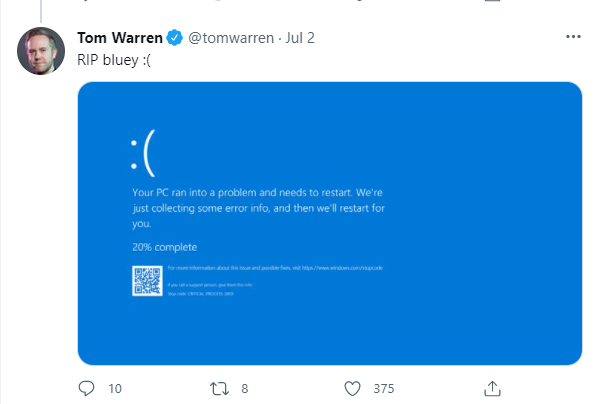
Blue Screen Of Death Changing To Black
Blue Screen Of Death

What Is The Black Screen Of Death All About?

According to Warren, Microsoft decided to change its Classic Blue Screen Of Death to match its current upgrade. The tech company has not commented anything on its new update for the screen of death yet. But loyal users like Warren are trying to find their own meaning.

Theories are going around about the new Black color being a part of Windows’s recent overhaul. Windows 11 comes with a whole new modern version that matches the speed and need of the pandemic hour. The new Black color matches well with the logon and Shut Down screens and is also a breath of fresh air. Apart from the color, the rest of the screen remains the same.
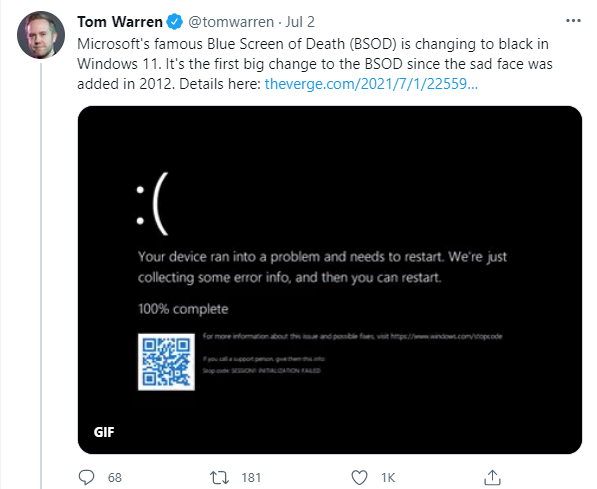
Microsoft's Blue Screen Of Death Changing To Black
New Black Screen Of Death Released By Tom Warren On Twitter

Back in 2012, Microsoft introduced the Blue Screen Of Death with a sad face emoticon and QR code. It was a new update in Windows 8 and remains the same as per the preview version of Windows 11.

What Is The Purpose Of The Blue Screen Of Death?

Microsoft introduced its Blue Screen Of Death with the 3.0 version way back in the 1990s. Through this screen, IT professionals and support staff could access more information when a system crashes. In Warren’s own words, a Microsoft-owned kernel error/bug check containing tons of information to fix software and hardware issues.

Conclusion

In addition to the Black Screen of Death, Windows 11 also comes with a host of upgrades. For instance, the start button, widgets, high-quality gaming, and much more.

Also Read: How To Customize The Taskbar In Windows 11?

Watch & Subscribe Our YouTube Channel
YouTube Subscribe Button

Latest From Hawkdive

You May like these Related Articles

blog wii remote mac bluetooth pairing fix 20261031

Nintendo Wii Remote Not Connecting to Mac: Bluetooth Pairing Fixes

Fix Wii Remote Bluetooth pairing failures on Mac. Step-by-step guide for macOS Sequoia, Sonoma, and older versions. Covers sync issues, Dolphin emulator, and Apple Silicon.
blog herdr native app ios fixes login sync crashes 20261030

Herdr Native App Not Working on iOS: Fixes for Login, Sync & Crashes

Herdr iOS app crashing, failing to login, or not syncing? Step-by-step fixes for the new native Mastodon client from Apple Support Community reports.
blog macos 27 battery optimization tips apple silicon 2026 20261030

macOS 27 Battery Optimization Tips for Apple Silicon Macs in 2026

Boost your Mac's battery life with macOS 27 battery optimization tips for Apple Silicon. Learn power management, M4 settings, and how to reduce drain effectively.
blog apple health app not syncing data fix 20261029

Apple Health App Not Syncing Data: Complete Fix Guide

Fix Apple Health app sync issues with step-by-step solutions. Restore activity data, workout records, and iCloud backup across iPhone and Apple Watch.
blog android 16 material you theming customize colors 20261029

Android 16 Material You Theming: Customize Colors Across Apps

Master android 16 material you theming with dynamic colors, wallpaper sync, and per‑app palettes. Step‑by‑step guide to personalize your UI.
blog iphone battery draining fast ios 18 fix 20261028

iPhone Battery Draining Fast After iOS 18 Update Fix

Fix rapid battery drain after iOS 18 update. Step-by-step solutions from Apple Support Community reports and expert troubleshooting.
blog ios 27 live activities sports track real time scores 20261028

iOS 27 Live Activities: Track Sports Scores in Real Time on iPhone

Learn how to use iOS 27 Live Activities to track sports scores in real time on iPhone with setup tips, customization, and battery advice.
blog fix older mac apps wont open after macos update 20261027

Older Mac Apps Won’t Open After macOS Update? Fix Compatibility Issues

Fix older Mac apps that won't launch after updating macOS. Step-by-step solutions for 32-bit, Rosetta 2, and Gatekeeper compatibility problems.
blog windows 11 25h2 gaming mode optimize fps 20261027

Windows 11 25H2 Gaming Optimization: How to Optimize PC for Maximum FPS

Learn windows 11 25h2 gaming optimization steps to boost FPS, enable Game Mode, and tweak settings for peak gaming performance on Windows 11.
blog fix iphone battery drain ios 18 update 20261026

Fix iPhone Battery Drain After iOS 18 Update: Complete Guide

iPhone battery draining fast after iOS 18? Learn why it happens and follow step-by-step fixes from Apple Support Community reports and expert knowledge.

LEAVE A REPLY

Please enter your comment!
Please enter your name here

This site uses Akismet to reduce spam. Learn how your comment data is processed.









