























Microsoft’s Blue Screen Of Death Will Be Changing To Black In Windows 11

GeneralMicrosoft's Blue Screen Of Death Will Be Changing To Black In Windows...

The American tech giant Microsoft, is determined to give the new Windows 11 a makeover from start to finish. So, on June 24th, the company unleashed its dynamic upgrade on a virtual event on YouTube. It’s been thirty years since Microsoft Windows came into our existence. From office files to playing games to accessing the internet, this software has allowed its users to get the maximum output in every aspect. However, in terms of its look and style, Apple’s OS has been overpowering it for a very long time. It is, therefore, a piece of great news to all Microsoft users that they have nothing to lose with the new upgrade launched by Microsoft. These days news of Microsoft’s Blue Screen Of Death Changing To Black In Windows 11 is trending everywhere.

Read : Windows 11: What’s New In Upcoming Windows Version?

Black Color Replaces The Blue Screen Of Death

On July 1st, The Verge released the news of Microsoft changing its Blue Screen Of Death, i.e. BSOD, to none other than Black. Senior Editor of The Verge, Tom Warren, posted pictures of both the screens, bidding adieu to the former.
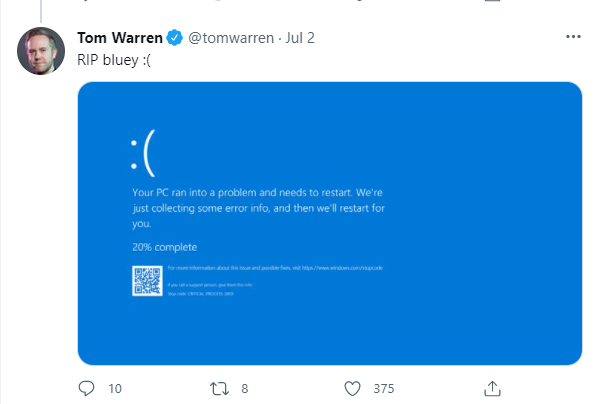
Blue Screen Of Death Changing To Black
Blue Screen Of Death

What Is The Black Screen Of Death All About?

According to Warren, Microsoft decided to change its Classic Blue Screen Of Death to match its current upgrade. The tech company has not commented anything on its new update for the screen of death yet. But loyal users like Warren are trying to find their own meaning.

Theories are going around about the new Black color being a part of Windows’s recent overhaul. Windows 11 comes with a whole new modern version that matches the speed and need of the pandemic hour. The new Black color matches well with the logon and Shut Down screens and is also a breath of fresh air. Apart from the color, the rest of the screen remains the same.
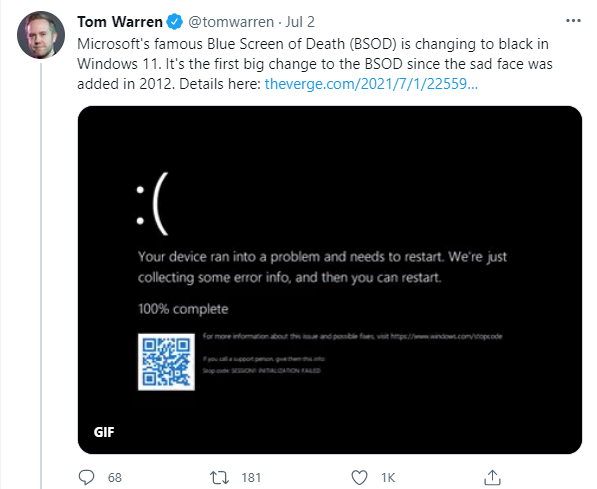
Microsoft's Blue Screen Of Death Changing To Black
New Black Screen Of Death Released By Tom Warren On Twitter

Back in 2012, Microsoft introduced the Blue Screen Of Death with a sad face emoticon and QR code. It was a new update in Windows 8 and remains the same as per the preview version of Windows 11.

What Is The Purpose Of The Blue Screen Of Death?

Microsoft introduced its Blue Screen Of Death with the 3.0 version way back in the 1990s. Through this screen, IT professionals and support staff could access more information when a system crashes. In Warren’s own words, a Microsoft-owned kernel error/bug check containing tons of information to fix software and hardware issues.

Conclusion

In addition to the Black Screen of Death, Windows 11 also comes with a host of upgrades. For instance, the start button, widgets, high-quality gaming, and much more.

Also Read: How To Customize The Taskbar In Windows 11?

Watch & Subscribe Our YouTube Channel
YouTube Subscribe Button

Latest From Hawkdive

You May like these Related Articles

blog chrome crashing mac june update fix 20260801

Chrome Crashing on Mac After June Update? Here’s How to Fix It

Chrome crashing or freezing on your Mac after recent security updates? Here's a complete troubleshooting guide to restore stable browsing on macOS.
blog deepseek v4 flash update apple fix 20260731

DeepSeek-V4-Flash Update Issues on Apple Devices: Fix Guide

Struggling with the DeepSeek-V4-Flash update on your Mac, iPhone or iPad? Follow this troubleshooting guide to fix crashes, install errors and slowdowns.
blog apple intelligence not publishing research fix 20260730

Apple Intelligence Not Publishing Research: Fixes & Workarounds

Apple Intelligence features failing to sync, publish, or share research summaries? Here's a complete troubleshooting guide with confirmed fixes for 2026.
blog tailscale jailbroken kindle troubleshooting fix 20260729

Tailscale on Jailbroken Kindle Won’t Connect? Fix It Fast

Tailscale failing on your jailbroken Kindle? Here's a practical troubleshooting guide to fix connection drops, key errors, and sleep-mode disconnects.
blog portable python macos troubleshooting 20260728

Portable Python on macOS: Fix Distribution & Path Issues

Struggling with portable Python distributions on macOS? Learn why they break on Apple Silicon and how to fix path, signing, and dependency issues fast.
blog decker macos not opening crashing fixes 20260727

Decker on macOS Not Opening or Crashing? Fixes That Work

Decker, the HyperCard-inspired app, crashing or failing to launch on macOS? Here are practical fixes, Gatekeeper workarounds, and troubleshooting steps.
blog stop meta ai training instagram photos reels 20260727

How to Stop Meta Using Your Instagram Photos and Reels for AI Training in 2026

Learn how to stop Meta AI training on Instagram with our 2026 guide. Opt out, tighten privacy settings, and protect your photos and Reels from data harvesting.
blog apple maps golf courses not showing fix 20260726

Apple Maps Not Showing Golf Courses Properly? Here’s the Fix

Apple Maps missing or misrendering golf courses on iPhone and Mac? Learn why it happens and how to fix golf course display issues in Apple Maps.
blog install macos 27 golden gate older macs guide 20260726

How to Install macOS 27 Golden Gate on Older Macs: Full Setup Guide

Learn how to install macOS 27 Golden Gate on older Macs with our full setup guide. Compatibility checks, backup steps, and post-install fixes included.
blog security camera github token leak apple users 20260725

Security Camera Leaked GitHub Admin Token: How to Protect Your Apple Devices

A security camera exposed a GitHub admin token in its login page. Here's how Apple users can audit, secure, and lock down smart home devices on their network.

LEAVE A REPLY

Please enter your comment!
Please enter your name here

This site uses Akismet to reduce spam. Learn how your comment data is processed.









